As your league grows with more and more players (fans, coaches, team admin, stats keepers), you need an easy way to find them. We have recently added a filter option to sort by roles. Have a look at the screenshot below.
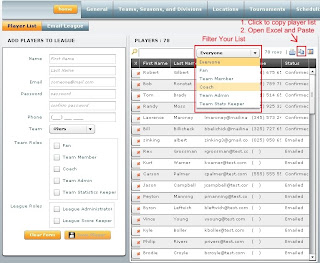 After you have filtered your list you can click the "Copy to Clipboard" icon, also in the screenshot above, then open Micrsoft Excel or Word or any other program and paste the filtered list into that program.
There is now a flexible Scoring Option system when calculating Standing Points. Some sports may want 2 points per win, or 10 points per win. You can now customize this by navigating to : League Administration > General > League Options
You can also control how many points a team gets for forfeiting a game and how many points they get for an overtime win or loss.

Also we have added a couple new Standings Columns : Over Time Win (OTW), Over Time Loss (OTL) and Forfeits.

When you are in the score keeping screen, just check the Over Time Game or Forfeit check box below.

 Where ever your see this question mark on the site, you can click it for some context specific help...So if you are on the League News Page, and you want to know how to add some League News, just click the green question mark and poof, you get a nice little yellow box telling you how to do it!
What a novel concept....help on the screen you actually need it on.


 Where ever your see this question mark on the site, you can click it for some context specific help...So if you are on the League News Page, and you want to know how to add some League News, just click the green question mark and poof, you get a nice little yellow box telling you how to do it!

